3. Networking
All Past Paper Questions: https://docs.google.com/document/d/1nh3nqeakyah_DlTDU933sHQ6ctyJldKSbenT5yAmisg/edit?usp=sharing
Networks
- Question

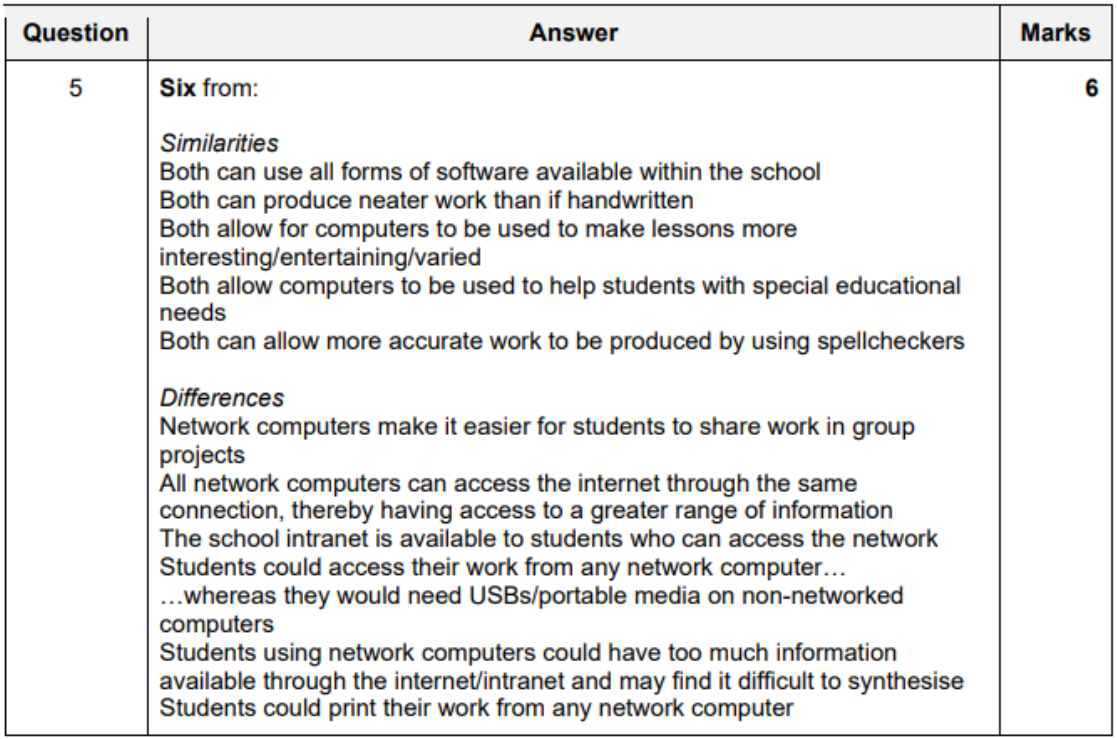
Computer Networks
- Advantages
- easier to share files in group projects
- easier for teachers to monitor students when working
- easier for network manager to roll out new software
- can access internet more easily
- school intranet would become available to all students more frequently
- can share peripherals
- Disadvantages
- easier for students to share work
- which could lead to copying
- bigger server maybe required when more clients added to network
- extra network points needed, so, expensive
- if server breaks, it might be unaccessible
- viruses can transmit easily (worms)
- easier for students to share work
Mobile Networks
-
how it works? how it enables transmission?
- phones connect to cell towers (base stations)
- divided into thousands of overlapping goegraphic areas
- typical mobile network is like a mesh of hexagonal cells
- each cell has its own base station at the centre
- base station provides cell with nerwork coverage
- which can be used for transmission of voice + data
- cells overlap at edges to ensure user is always connected (within range of a base station)
- RF signals transmitted by individual phone to a base station
- RF signals re-transmitted from base station to another base station
- transmitting and recieving are done over different frequencies
- base stations connected to one another via central switching centres
- the central switching centres track calls and transfer them from one base station to another as caller moves between cells
- mobile phone is a two way radio containing both lower-power transmitter and a reciever
- a cell typically uses different set of frequences from neighbouring cells
- phones connect to cell towers (base stations)
-
Advantages
- more coverage than WiFi
- forces users to depend upon hotspots in each area visited
- 4G offers a coverage of 30 miles
- and more and with overlapping networks
- high ranges means connectivity all the time
- mobile devices can be used out in the field
- portability
- big problemts with wifi networks in online security
-
Disadvantages
- more expensive
- quality can be poor if you are not close
- could go 2G, 3G, etc..
- power consumption issues on devices powered by batteries
- mobile VPNs are unsafe to connect to
-
3G vs 4G
- similarities
- mobile networks
- allows phone to be used as SATNAV
- allow smart phones to access WWW
- allow video calling on phones
- allow emails to be sent by phone
- allow music/videos to be downloaded to phone
- differences
- 4G is faster than 3g
- 4G gives smoother browsing experience
- 4G allows video/music to be played without buffering
- battery lasts longer on 3G than 4G
- 3G data allowance is cheaper than 4G
- 4G is faster than 3g
- similarities
Topologies
- LAN
- covers smaller geographical area
- does not always need a router to connect computers togethers
- uses L1, L2, L3 devices
- high rate of data transfer
- WAN
- made by connecting many LANs through a router/modem
- covers larger geographical area
- uses L3 devices only
- private WANs used by organizations to connect to LANs
- by leasing telephone lines (PSTN)
- or private fiber optic cable (purely for their own use)
- these can be VPNs (Virtual Private Networks)
- or, using a telecommunications network will make data rate slow
- Comparisons
- LAN vs WAN
- similarities
- both are used to connect computers togethers
- providing all advantages of a computer network
- both can be connected using a copper cable or fiber optic cable
- both are used to share files
- differences
- faster data transfers in LAN
- fewer errors in data transfers occur in LANs
- WANs cover a larger geographical area than LAN
- LAN is more secure, as not connected to outside
- WANs are more complex
- so, less fault tolerant
- LAN shared information needed by each branch wheras WAN shares the information needed by all branches
- similarities
- LAN vs WAN
Connection Types
Client-Server Networks
-
more secure than P2P networks
-
servers will handle authentication and authorization to accessing resources
-
if a client crashes/disconnects, it doesnt affect other clients or the server
-
Advantages
- centralized database of user information makes it more secure
- users do not need to worry about making backups
- upgrading is easier (only have to upgrade the server)
- easier for user to access, with alternate devices
- easier for the end-user in many ways...
- as new information is uploaded in a database, each computer need not to have its own storage capacity increased
-
Disadvantages
- if server goes down, whole network is affected
- need a IT Staff
- need to pay salaries
- eg: network manager
- servers expensive to setup and maintain
- many servers trying to access data from server can cause overload
Peer to Peer Networks
- can communicate and share files with every other computer on the network
- Advantages
- cheaper (no need to buy servers)
- does not servers
- as files accessed from inidividual's workstations
- no need to pay IT staff (System Administrator, Network Technicians)
- overall cost of setting up is cheaper
- very redundant
- if one computer fails, it will not disrupt anything
- everything else will continue
- cheaper (no need to buy servers)
- Disadvantages
- files and folders are difficult to recover as they cannot be centrally backed up
- more difficult to share
- with magnets and torrent descriptor files
- less security than permissions
- system is not cntralised, hard to administrate
- more expensive security, all devices should have its own anti-virus
- diificult to have more than a few users
- peers should have good storage too
- when peer being accessed by other peers, it might slow the computer down
Comparison
| Aspect | Client-Server Network | Peer-to-Peer Network |
|---|---|---|
| Resource Pooling | Resources centralized on one server | Resources pooled by all peers |
| Communication | Clients communicate with the server | Peers communicate directly with each other |
| Availability | Server crash affects entire network | Peer crash does not affect other peers |
| Security | Server controls network security | Each peer responsible for its own security |
| Backup | Data backed up by server | Each peer must back up its own data |
| Setup Complexity | Requires specialist knowledge | Easier to set up, no specialist knowledge needed |
| Management | Easier to administer and manage | Difficult to manage due to decentralization |
| Performance | Server handles tasks without affecting client performance | Performance can be slower as peers may perform multiple roles |
| Virus Protection | Centralized virus protection | Each peer needs its own virus scanner |
| Upgrading | Easier to upgrade the server | More difficult to upgrade, each peer needs attention |
| Cost | Higher due to server and IT staff | Cheaper, no need for servers or dedicated IT staff |
| Redundancy | Single point of failure if server goes down | High redundancy, peer failure does not disrupt network |
Summary
-
Client-Server Network:
- Advantages: Centralized security and backups, easier upgrading and management, better performance.
- Disadvantages: Single point of failure, higher setup and maintenance costs.
-
Peer-to-Peer Network:
- Advantages: Cheaper setup, high redundancy, easy to set up.
- Disadvantages: Decentralized management, each peer needs its own security and backups, potential performance issues.
Internet
-
meanining
- global system of interconnected computer systems
- uses TCP/IP to link devices
- network of networks linked by an array of electronic, wireless and optical networking technologies
-
there is a danger of accessing inapproprate / insure websites
-
for communication
- advantages
- disadvantages
-
for a bussiness / having precense on internet
- Benefits
- wider audience
- low cost advertising
- opens opportunity for staff working from home
- save office costs (rent)
- enables companies to share knowledge quickly & easily
- product information can be accessed anytime & anywhere
- quicker bank transfers with online banking
- customer payments recieved quickly
- payments can be gauranteed
- can send orders to other companies
- Drawbacks
-
works can get distracted by other stuff
-
employees can steal company data + infect machines
-
customers can post reviews easily
- if bad review posted about company, it cannot be removed
-
loose face-to-face human interaction
-
- Benefits
Services
-
e-mail
- electronic mail
- email is a message that may contain text, files, images or other attatchments
- sent through a network to an individual or a group of individuals
- can be sent with somebody copied in without the other recipients knowing
-
WWW
- world wide web
- description
- system of internet servers
- that support formatted HTML documents
- tends to be upto date
- has vast amounts of information
- how it works?
- invented by Tim Berners Liee in 1989
- can be accessed via the internet
- accessed using web browsing software
- HTML is a markup (formatting) lanuage for WWW
- web pages are text documents formatted and annotated using HTML
- uses URL (Uniform Resource Locator)
- an address thats unique to identify the web page
- HTTP allows retireval of linked resources across the web
- HTTPS provides secure websites
- web pages may contain images. video, etc...
- hyperlinks allow users to navigate between web pages
- comporises websites made up of a number of web pages
- is basically a system of web servers (serving HTML documents)
-
video conferencing services
- to conduct conferences between two or more participants
- at different sites
- by using computer networks to transmit audio and video
- video codecs used to transfer data
- requires digital compression of audio and video streams (in real time)
- hardware/software that performs compression is called a codec
- compression ratios of 50:1 are achieved
- digital stream is subdivided into data packets
- which are transmitted through digital network
- each packet has a 'header' that identifies its contents
- protocol used is usually determined by the need to have reliable or unreliable communications
- TCP is a protocl designed for error free transmission of data
- when delivery needs to be assured
- will retransmit missing packets when data is lost
- can cause delays and reduced throughput
- UPD is a less reliable protocol
- if data is lost, its not retransmitted
- video conferencing should use UDP over TCP
- because packets arrived late would ruin the conference
- how video codecs are used?
- short form of coder-decoder
- used to encode/decode digital data stream
- used to compress data to reduce transmission bandwidth
- the decoder reverses the encoding for playback
- there are many different types of codecs
- without codecs, downloads will take very long
- its common to need 10-12 codes to play users's media
- impact on
- general people
- more people able to use this
- as its cheaper now
- as hardware is powerful now
- availability of freeware makes it highly accessible
- enables more people to stay in contact with friends/family
- deaf people can talk with sign language
- can result in loss of physical social interaction
- more people able to use this
- medicine (doctors, nurses, patients)
- patients who are bed ridden can contact nurses and doctors
- can discuss with doctors remotely
- can use in rural areas
- doctors can teach students
- observe surgical procedure
- advantages
- saves time and money
- will save time by not staying overnight
- doctors are less fatigued
- saves time of printing large documents
- less likely to misplace documents
- safer
- no travel
- less accidents
- environmentally friendly, no car is needed
- hospital doctors can demonstrate procedures to other doctors
- disadvantages
- poor video quality (bandwidth)
- video & audio lag
- power outages - breakdown of transmission
- hackers can hack meeting
- hackers can gain access to patient documents
- doctors maybe put off by camera (as people are self concious when being recorded)
- when not at home, extra equipment needed to join meeting
- education (teachers, students)
- opportunity to learn content from other regions
- lectures made available world wide
- ill students can still study
- diverse community can learn about each other
- can virtually visit meuseums, educational facilities, etc...
- several campusus can collaborate and share lectures.
- legislators / lawyers
- lawyers no need to attend from faw away
- saving travel expenses
- representatives can take part in meetings happening at many locations
- problems with video transmissions can lead to misunderstandings
- saves task/money for booking a room for the meeting
- lawyers no need to attend from faw away
- bussiness people
- no travel expenses
- to meet physically
- taxi
- hotel accomodations
- saves time
- flight delays
- traffic jams
- easier for employees
- can stay home... eg: if they have a sick child
- workers can share word/spreadsheet files online
- much less personal interaction
- no travel expenses
- news presenters
- can hold meeting with more than just one person
- can speak with people from many countries simultaneously
- do not have to wait for eye witnesses
- presenters do not have to travel to dangerous areas
- wars, terrorists
- general people
-
VoIP
- Voice over Internet Protocol
- delivery of voice communications
- and multimedia sessions over IP networks
-
instant messaging
- to communicate vis messages in real time over the inertnet
- service similar to SMS provided over the internet
-
video streaming
- video is sent to viewer in real time
-
file transfer
- transmitting files over a computer network like the internet
Internet vs WWW
- Internet
- international network of networks of computers
- refers to the physical connection between networks of computers
- consists of hardware
- consists of computers, cables, routers, switches, repeaters
- physical layer on which protocols are in use to carry data all around the world
- WWW (World Wide Web)
- WWW uses hypertext to access the information in internet
- this is only one of the services provided by the internet
- accessed through web browsers
- Other
- Instant messaging uses the internet without WWW
- IP Phones (calling over internet) have their own VoIP protocols and no need WWW
The internet is the
The world wide web is /users browsing
Intranet
-
private networked used within one organization
-
can only be accessed by workers within organization
-
based on TCP/IP protocls
-
used to share information within the organization
-
tends to be a LAN
-
private computer network within one organization
-
can only be accessed by workers
-
need user IDs and password to prevent outsiders (authorization and authentication)
-
based on internet technologies like TCP/IP
-
there is a client-server relationship
-
used to share information within organization
-
tends to be a LAN
-
has greater security
-
contains forms for workers. eg: claiming expenses
-
how to extend an intranet to an extranet?
- extranet is a means of extending an organization's intranet for use by selected people
- if staff is working remotely,
- they can access it using a VPN
- extranet is a setup
- by providing a secure link
- to the intranet
- using the internet
- examples:
- employees to work from home using the internet
- students to submit asstesments
- hospital giving access to booking system for doctors
- company giving access to supplier for inventory management
- extranet is a means of extending an organization's intranet for use by selected people
Extranet
-
website that allows controlled access to authorized users to an organizations network
-
usually only allows access to a subset of information on the organizations intranet
-
provides access to specific services without granting access to organizations entire network
-
operates within VPN framework
-
operated over public telecommunications protocls
-
purpose
- An extranet is a controlled private network that allows access to authorised customers.
- grants access to some resources of organization (sometimes with authorization)
- All of a company's ordering can take place via a secured private network.
- more stuff:
- Extranets allow companies to integrate operations with external stakeholders.
- Suppliers are able to communicate with the business.
- Customers can use it to place orders.
- Customers can access information such as support information.
- Any interaction with suppliers occurs in real time.
- A companys clients/customers can upload documents, ask questions whenever they have the time to do so.
Connection Types
-
IEEE 802.11
- specifications for MAC (media access control) and PHY (physical layer)
- to implement WLAN (wireless local area network)
- specifies an over-the-air interface between two clients
- used in the 900 MHz and 2.4, 3.6, 5, and 60 GHz frequency bands
- used in homes and SOHO (smal office home office)
- Created and maintained by the Institute of Electrical and Electronics Engineers (IEEE) LAN/MAN Standards Committee (IEEE 802).
-
ADSL
-
explanation
- Asymmetric digital subscriber
- type of DSL broadband communications technology
- used for connecting to the internet
- more data can be sent in copper cable than (existing) telephone lines
- microfilter allows the use of both ADSL and telephone line simultaneously
- need special ADSL modem.
- data rates:
- downstream: 1.5 to 24 Mbps
- upstream: 16 to 640 Kbps
- Asymmetric digital subscriber
-
asynchronous digital subscriber line
-
bandwdith and bit rate is greater toward the subscriber
-
ISPs usually provide ASDL as a service
- to recieve internet acces
- in a relatively passive mode
-
video conferencing would stutter due to low speeds
-
-
SDSL
- synchronous digital subscriber line
- bandwdith and bitrate in the downstream direction
- aimed at bussiness customers
- more expensive
- high bandwdith
- can use for video conferencing
-
ISDN
- integrated services digital network
- allows simultaneous digital transmission of voice, video, data
- over PSTN (Public Switched Telephone Network)
- Circuit swicthed telephone network system
- also provides access to packet switched networks
- results in better quality
- than an analgue phone can
- extremely expensive
- HD videos conferencing achievable
- with PRI (Primary Rate Interface)
- alsmost similar qualities like when using SDSL
VPNs
-
Virtual Private Networks
-
Meaning
- is not physically a private network
- uses internet other than WAN to transmit data
- data remains encrypted throughout transmission
- data is only decrypted at destination computer
- this process is called tunneling
- as it uses secure means to tunnel
- through a publicly accessible network
- uses public telecommunications system
- normally consist of LAN that maybe remote to each other
- like different branches of an organization
- enables organizations to communicate over a large area
- cheapter than creating conventional WAN
- the security used consists of firewalls, encryption, the use of IPSec - IP Security
-
Purpose
- enable organizations to communicate over a large area securely
- enable employees to transmit data securely
- enable employees to access company data remotely
- to restrict which external users are able to use company's network
- to restrict the resources the external user is permitted to use
-
How it works?
- this process is called tunnelling
- as it uses secure means to tunnel through a publicly accessible network
- it uses encryption
- involves the use of private and public keys
- scrambles data so that only the key holder can understand it
- data remains encrypted throughout transmission and is only decrypted at the destination computer
- it can use IPSec
- is a network protocol suite that encrypted packets of data ent over a network
- protects data flows between a pair of hosts
- it uses a firewall
- which controls the incoming and outgoing network traffic
- establishes barrier betweena trusted, secure internal network and another outside network or computer
- it uses authentication, authorization and accounting
- AAA server is a program that handles user requests for access to resources
- AAA server intercts with network access and and gateway servers
- uses asymmetric encryption to establish the session
- and then, symmetric encryption for the main conversation
- this process is called tunnelling
-
Advantages
- offer a much higher level of secure communication when compared to other methods
- every file coming into a computer or going out from a computer is encrypted
- so, no unwanted user will be able to open the files and understand it
- can be used to work automatically as part of logging on
-
Disadvantages
- company may not permit him to use other third party software on his computer
- in order to safegaurd the integrity of their VPN connection
- use of mobile device to iniate access to VPN can cause security issues
- if local wireless network is insecure, or using public wifi
- packet loss will be higher with the VPN and cause data to be lost and need to be retransmitted
- increasing time taken to recieve documents
- connection depends on ISP, so, performance can be variable
- will need to install extra anti-malware tools to ensure his PC is clean
- to meet the company's security standards
- company may not permit him to use other third party software on his computer
Search Engines
- lack of experience of developer might lead to bad search engine optimization
Packet Switching
Using TCP (Transmission Control Protocol) with IP (Internet Protocol). UDP (User Datagram Protocol) is also used instead of TCP sometimes.
- how data is sent?
- data divided to packets
- packets are whats being sent in network
- each pakcet has header that identifies the contents
- protocol used (TCP or UDP) determined on use case
- TCP is a protocol which we can transmit data
- used for error free transmission of data
- when delivery of data needs to be assured
- will retransmit missing packets when data is lost
- can cause delays and reduced throughput
- UDP
- is less reliable
- data lost in transmission is not retransmitted
- eg:
- UDP suites best for video conferencing
- as data arriving late would spoil the conference
- UDP suites best for video conferencing
- TCP is a protocol which we can transmit data
Online Shopping (for Digital Divide)
- disadvantages for developing countries
- Some people in developing countries have no actual postal address making the delivery of goods which are purchased online difficult (1)
- Many people in developing countries have no access to broadband so speed of purchase is slower (1)
- Many people in developing countries have no PCs/Iaptops/smartphones/tablet computers so need to borrow a PC/go to a library (1)
- In developing countries power outages can mean that connection is lost during the process and so have to start again/lose the sale (1)
- Many people in developing countries do not have bank accounts and credit cards so have to organise for someone else to buy the product on their behalf (1)
- In many developing countries, goods bought using the internet are not covered by consumer-protection laws so people have no protection from unscrupulous sellers (1)