1. Data Processing and Information
Data and Information
- data:
- 'raw data' has no meaning
- eg: characters, symbols, images, audio clips, video clips and so on, none of which, on their own, have any meaning
- eg: 110053, 641609, 160012 (these are just some set of numbers with no meaning)
- information:
- data that has been given meaning
- computers process data and make it information
- eg: 110053, 641609, 160012 are some postal codes in India (data is give meaning here)
Data processing
- data stored as bits (binary digits)
- input (data) -> stored -> processed -> output (information)
- eg: parity checks, etc..
Direct Data
Description
- aka "original data"
- description
- data collected for an specific purpose
Sources
- Questionnaires
- set of questions on specific issue
- types:
- Closed questions - choose from given answers
- Open questions - can write our own answers (in detail)
- Interviews
- formal
- interviewer asks questions, interviewee replies
- types:
- Structured interviews:
- same for everyone
- select from given set of answers
- Unstructured interviews:
- different for each person
- give any answer
- Structured interviews:
- Observation
- data collectors watch the situation
- collects information of seeing whats happening rather than directly asking
- Data logging
- input (sensors - 1 or more) -> analyzed -> output (graphs)
- collected for a period of time, with regular intervals
- used in scientific experiments (when need to collect faster than humans can)
- measures: temperatures, sound frequencies, light intensities, electrical currents, and pressure
Uses
- eg: planning a bus route
- data collection
- where people prefer to have the bus stops (Questionnaires)
- walking times to the bus stop for everyone (Observation, Interviews)
- potential passengers who would use the new route (Interviews)
- Number of passengers using that route (Data Loggers)
- data collection
Indirect Data
Description
- obtained from a third party
- and used for a different purpose than the original
- eg:
- electoral registers,
- data brokers: businesses collecting personal information for use by other organizations
Sources
third-party sources that the data gatherer can obtain data from.
-
electoral register (electoral roll)
- list of adults who can vote
- contains named, addresses, age, and other personal information
- the personal information must comply country's data protection
-
Businesses collecting data from third parties
Uses
- to select people for credit reference
- to carry out identity checks
- charities often use it for fundraising purposes
- debt-collection agencies use it to track down people who owe money
Direct Data vs Indirect Data
| Aspect | Direct Data Collection | Indirect Data Collection |
|---|---|---|
| Reliability | High (origin of data is known) | Low (unknown origins) (may have sampling bias) |
| Sample Representation | Ensures a representative cross-section of the group is sampled | May represent only a small section of the group |
| Time Taken | More (larger sample sizes) | Less (provides larger data sets) |
| Accessibility | Physical access issues | Can do from inaccessible groups |
| Availability | Dependent on respondents | Sample size increases confidence in results |
| Specific Data | Can do | Cannot do |
| Data Quantity | Can collect more | Include irrelevant data |
| Timeliness | Low (can be lengthy and outdated) | High |
| Data Quality | Low (need to interpret and categorize) | High (categorized) |
| Expense | Higher (pay collectors) | Lower (eg: no travel) |
| Commercial Value | Opportunity to sell | Organizations can go directly to the indirect source, limiting resale opportunities |
Quality of Information
- when data is poor quality
- distorted views for businesses
- businesses make poor decisions
Factors affecting the quality of information
Accuracy
- accurate data collection -> information accuracy
- inaccurate data = inaccurate information
- should be careful when collecting data
- inaccuries can be causes even by simple errors like:
- digit transportation
- data entry errors
- surveys should be clear and unambiguous
- to prevent biased responses
- and, ensure the surveys are representative
- multiple choice questions to quanitify responses
- when using sensors, calibrate and install them properly (to get a proper accurate reading)
Relevance
- why this particular data is being collected?
- ask yourself: is this data really needed?
- dont ask unrelated questions, eg:
- data from other regions of the country
- etc...
- be clear about what our specific needs are
- eg: students may find stuff in subjects that are interesting, but it might not be able to
Age
- information should be upto date
- eg: personal information in website being unchanged
- they could marry and have a baby, but its not updated
- leading to inaccurate information
- affecting companies
- targettied ad companies, etc..
Level of detail
- information should have the right amount of detail
- when too much detail, its hard to extract the details we want
- when too much summarized/short, data we required might be lost
Completeness
- if there are gaps in data, its very difficult to analyze it
- if incomplete,
- either data is complete enough to make a decision,
- or, additional data needs to be collected
Encryption
-
if our (online) activity is intercepted by a man in the middle,
- they can use our data for identity fraud, cyber fraud, or can be ransomed off
- hackers can even sell company data to rival companies
-
when data is encrypted, it prevents hackers from understanding it, even if intercepted
-
in encryption, data is scrambled in a way that is completely unreadable, all they can see is some random selection of letters, numbers and symbols
-
plain text (before encrypted) -> cipher text (after encrypting)
-
advantages
- protects personal information
- eg: credit card details: from identity theft & cyber fraud
- prevents company secrets from being sold to rivals
- ensures data integrity during transmission
- protects personal information
-
disadvantages
- slower data loading and increased processing power required
- initial communication (handshake) between client and server adds latency
- larger key sizes enhance security but need computational resources
- ransomware can exploit encryption by locking data and demanding a ransom for the key
- losing the private key can resuklt in permanent data loss
- decrypted data, if left unprotected, is vulnerable to attacks
Methods of Encryption
- converting data into a code by scrambling it, with the resulting symbols appearing to be all jumbled up.

- many systems use 128-bit keys, which gives
2^128different combinations, it would takes one quintillion years for a computer to bruteforce it, breaking it nearly unbreakable. - using a 256 bit key is also much better
- there are two types of encryption
- symmetric encryption
- asymmetric encryption (aka public-key encryption)
Symmetric Key Encryption
-
aka: secret key encryption
-
same key used to both encrypt and decrypt the message
- issue: in communication, we cannot securely share the encryption key
-
faster, simpler than asymmetric
-
advantages
- faster
- less complex (less computational complexity)
- suitable for encrypting large amounts of data
-
disadvantages
- requires secure sharing of secret key (this issue is why asymmetric encryption exists)
Asymmetric Key Encryption
-
aka: public-key encryption
-
used to:
- digitally sign documents
- send emails (verify authentication, non repudiation, using Digital Signatures)
-
uses two keys:
- public key
- distributed publicly, anyone can see it
- anyone can encrypt the message using this key and send it to the reciever (key owner)
- private key
- not shared with anyone
- used to decrypt the message encrypted by the matching public key
- public key
-
these two keys are mathematically linked based on prime number theory
-
advantages
- secure key distribution using public and private keys
- ideal for establishing secure communication channels
-
disadvantages
- slower and computationally intensive
- not suitable for large data encryption
Encryption Protocols
-
"encryption protocols" define rules for securing information
-
IPsec provides secure, encrypted communications over IP networks
-
used in VPNs for secure data packet transmission
-
SSH enables secure remote login and operations on networks
- SSH is also used to transfer files/data
-
TLS is an improved version of SSL
- TLS is most important protocol for secure web page access
- SSL/TLS is sometimes used to refer to both protocols together
-
full forms:
- IP - Internet Protocol
- IPSec - Internet Protocol Security
- VPN - Virtual Private Network
- SSL - Secure Sockets Layer
- Transport Layer Security
IPSec
- IPsec provides secure, encrypted communications over IP networks
- Advantages:
- Both client and server are authenticated, enhancing security.
- Supported by a wider range of operating systems.
- Disadvantages:
- More complex management due to required client and server certificates.
- Higher costs due to client software purchase and complex setup.
Purpose of SSL/TLS
-
SSL and TLS terms are used interchangeably, since TLS is improved SSL.
-
main purpose:
- enable encryption to protect data
- authenticate the identities of parties exchanging data
- ensure data integreity to prevent corruption or alteration.
-
additional purposes:
- ensure compliance with PCI DSS (Payment Card Industry Data Security Standard)
- improves customer trust by showing the use of SSL/TLS for security.
-
many websites these days use SSL/TLS for data transmission
- it creates a secure conenction between client and server,
- its used to send data online
-
HTTPS (HTTP Secure) uses SSL/TLS
-
what happens:
- client verifies server using digital certificates
- DC contains information like
- domain name
- certidicate authority
- public key
- date of expire
- etc...
- verification takes place
- keys are agreed
- session is created
-
DC prevents fraud as it verifies website ownership
-
(Note: its called SSL Certificates, not TLS Certificates)
-
Certificates are issued by certificate authorities (CAs), which can be private companies or governments.
-
CAs conduct checks before issuing certificates to ensure identify / uniqueness.
-
if hackers breach CA, they can issue fake certificates and compromise encryption
-
advantages:
- Only the server needs a digital certificate; (client certificates are optional).
- Easier to manage digital certificates, saving time and money.
- No need to buy client software; simpler setup and management.
-
disadvantages:
- Extra software may be required for non-web applications.
- Some operating systems do not support SSL/TLS VPN tunnels.
- Optional user authentication weakens security compared to IPsec.
Use of SSL/TLS (client-server)
- TLS usage
- secure data exchange in client-server networks
- enable VPN connections and VoIP connections
- SSL/TLS connection setup
- client gets server's public key from its digital certificate
- digital certificate proves authenticity of the server
- SSL/TLS handshake project
- client initiates connection by sending SSL/TLS version and list of "cipher suites"
- server responds with chosen ciphersuite and its SSL certificate
- client verifies the certificate (whether its a trusted CA, valid date, legitimate keys)
- client sends an encrypted random string to calculate the private key
- client sends a final encrypted message to complete the handshake
- key points
- handshake occurs before data transfer
- client checks server certificate validity
- client and server agree on encryption rules
- client optionally authenticates itself to the server
Uses of Encryption
- usage examples:
- protect confidential employee data (medical records, payroll, personal data)
- prevent unauthorized access to work on shared office devices
- secure sensitive business plans shared over the internet
- protect data on portable devices during travel
- over 600 devices lost by UK government staff were protected due to encryption
- scenarios:
- emailing confidential information
- online shopping and banking (encrypts debit/credit card details)
- general good practice for securing sensitive online activities
Hard-Disk Encryption
- process
- files encrypted when written to disk
- decrypted when read
- entire disk, including OS and software is encrypted
- benefits
- protects data if the disk is stolen or left unattended
- automatic encryption without user intervention
- drawbacks
- risk of data loss if disk crashes or OS is corrupted
- booting can be slower
- encryption keys must be stored safely
Email Encryption
- Importance:
- Prevents unauthorized reading of email content.
- Protects sensitive information from hackers.
- Three Parts:
- Encrypt the connection to the email provider.
- Encrypt messages before sending.
- Encrypt saved or archived messages.
- Preferred Method:
- Asymmetric encryption: public key for encryption, private key for decryption.
- Considerations:
- Encrypt all emails to prevent identifying sensitive ones.
- Manage digital certificates to prove authenticity.
Encryption in HTTPS Websites
- HTTP vs HTTPS
- HTTP is not encrypted, allowing data interception.
- HTTPS uses SSL/TLS for secure web browsing.
- Indicators of HTTPS
- URL (Uniform Resource Locator) starts with
https://
- URL (Uniform Resource Locator) starts with
- how HTTPS works:
- browser performs handshake with server
- session key is created, encrypted with public key, and sent to the server
- server decrypts session key; subsequent data encrypted with this key
- combines asymmetric (for session key) and symmetric encryption (for data transfer)
- advantages
- secure data transmission
- higher search engine ranking for HTTPS websites
- disadvantages
- slower loading times
- extra works for managing SSL certificates
Comparisons
Tabulated
| Category | Advantages | Disadvantages |
|---|---|---|
| General Encryption | Protects personal information from identity theft and cyber-fraud | Slower data loading |
| Prevents company secrets from being sold | Requires more processing power | |
| Ensures data integrity | Initial handshake adds latency | |
| Larger key sizes need more computational resources | ||
| Vulnerable to ransomware: hackers encrypt our files, remand for ransom, when paid, they provide key to decrypt our data back | ||
| Permanent data loss if private key is lost | ||
| Decrypted data left unprotected is vulnerable to attacks | ||
| Symmetric Encryption | Faster due to less computational complexity | Requires secure key sharing |
| Suitable for large data encryption | ||
| Asymmetric Encryption | Secure key distribution using public and private keys | Slower and more computationally intensive |
| Ideal for establishing secure communication channels | Not suitable for large data encryption | |
| SSL/TLS for VPNs | Only server needs a digital certificate | Extra software may be needed for non-web applications |
| Easier digital certificate management, saving time and money | Not all operating systems support SSL/TLS VPN tunnels | |
| No need for client software purchase; simpler setup and management | Optional user authentication weakens security compared to IPsec | |
| IPsec for VPNs | Both client and server authenticated, enhancing security | More complex digital certificate management |
| Supported by a wider range of operating systems | Higher costs due to client software purchase and complex setup |
Accuracy of Data
- importance of accuracy of data
- ensures accurate data processing results
- data entry is time consuming
- errors increase time needed for corrections
- use validation and verification to minimize errors
- methods
- Validation: ensures data is reasonable
- Verification: ensures accuracy during data entry
- needs
- complementary methods: both are needed to ensure data accuracy
- validation: ensures data is reasonable and sensible
- verification: ensures data is accurately transferred or enetered
- combined use: ncessary for overall data integreity
Validation
- Ensures data conforms to system expectations.
Perence Check
- ensures important fields are not left blank
- eg: command key fields in a database: ISBN, Book_Borrower_ID
Range Check
- ensures numeric data falls within specific range (given)
- checks data against two boundaries
- eg: book costs between $10 and $29
Limit Check
- checks data against one bounary (unlike 2 boundaries in range check)
- eg: age must be 17 or older to apply for a driving license
Type Check
- ensures data is of the correct data type
- typically checks for
- numeric: 0123456789
- alphanumeric: alphabetical + numeric
- invalid character check (aka character check): no invalid characters are enetered
- eg: Borrower_ID should be numeric
Length check
- ensurs data has the correct number of characters
- eg: ISBN must be 13 characters long
Format Check
- ensures data follows a specific format
- eg: date of birth as DD/MM/YYYY
Check Digit
- validates numeric data using a checksum
- eg: ISBN last digit verification
Lookup Check
- compares data against a list of valid entries
- eg: class field with predefined class names
Consistency Check
- ensures data across two fields is consistent
- eg: class and dateOfBirth consistency (age to school_grade)
Verification
- Prevents user input mistakes
Visual Checking
- person who enters data compares enetered data with the source document
- methods
- on screen comaprison
- printout comparison
- drawbacks
- time-consuming and potentially costly
- errors maybe overlooked if the same persoan checks their own data
- so, different person should check the data
- so, more expensive
Double Data Entry
- data is entered twice for comparison
- methods
- single person enteres data twice
- computer comapres both entries and alters to differences
- features
- keyboard freez during error correction
- computer-driven comparison, unlike visual verificaion done by a user
Parity Check
- ensures data is transmitted accurately by adding a parity bit to each byte (8bits (message) + 1bit (parity) = 9bits (total) )
- even parity: parity bit ensures even number of 1s in each byte
- eg: with ASCII (American Standard Coe for Information Interchange)
- ASCII uses 128-bits
- unprintable control codes and are used to control peripherals such as printers
- eg: 0: null string
- eg: 8: backspace key (on keyboard)
- unprintable control codes and are used to control peripherals such as printers
- 'A' is 65 (denary)
- so, 'BROWN' is represented with 66,82,79,87,78
- when converted to binary:
- 01000010 01010010 01001111 01010111 01001110
- ASCII uses 128-bits
- Extended ASCII uses 256-bits (representation: 8 bits + 1 bit parity = 9 bit total)
how to add the parity bit
- if even number of one's, add 0 to RHS
- if odd number of one's, add 1 to RHS
-
very effective
- do this 8 bytes (rows)
- write parity checks both veritcally and horizontally for column and row of bit sets
- cross check it again
-
limitations
- cannot detect miltiple bit errors
- two 1s transmitted as 0s
- cannot detect transportation errors
- 1 and 0 being swapped
- cannot detect miltiple bit errors
Checksum
- used to verify accuracy of entire files during transmission
- mechanism:
- calculated using hashing algorithms (one way functions)
- MD5, SHA1, SHA256, SHA512
- MD5 has 32 hexadecimal characters
- file hash is transmitted with the file and recalculated upon receipt for comparison
- if hash matches, file has been altered during transmission
- calculated using hashing algorithms (one way functions)
- drawbacks
- potential of rindeitical checksums for different files
- newer algorithms are more reliable (eg: SHA2, SHA3)
Hash Total
- a form of checksum performed on speicific data fields
- mechanism
- add all numbers in a field or a file. eg: Student IDs
- transmitted with the data
- recalculated at the end for comaprison
- example
- some of student ids: 4762 + 153 + 2539 + 4651 = 12105
- 12105 is sent
- reciever recalculates this,
- if he gets 12105, then, the check passes
- used only for verification, not for other calculations
- Limitations:
- Cannot detect transposition errors (e.g., swapped data entries).
Control Total
- Similar to hash total, but calculated on numeric fields with meaningful use.
- Mechanism:
- Adds numeric values (e.g., exam passes).
- Transmitted with the data and recalculated for comparison.
- Example:
- Sum of exam passes: 6 + 8 + 7 + 3 = 24.
- Used to calculate averages or other meaningful statistics.
- Limitations:
- Cannot detect transposition errors (e.g., swapped data entries).
Summary
- Visual Checking: Manual, time-consuming, prone to oversight.
- Double Data Entry: Computer-driven comparison, prevents entry errors.
- Parity Check: Simple, effective for single bit errors, not for multiple or transposition errors.
- Checksum: Ensures file integrity, newer algorithms more reliable.
- Hash Total: Verifies data transmission, used for non-numeric fields.
- Control Total: Verifies data transmission, used for numeric fields with meaningful results.
Validation vs Verification
Comaprison
| Point | Validation | Verification |
|---|---|---|
| purpose | checks data is reasonable and sensible | ensures data is entered (or copied) correctly |
| performed by | always by a computer | can be done by a computer or human |
| limitation | cannot detect if data was copied incorrectly | cannot ensure if the data itself is accurate or reasonable |
| example | Format check accepting FD236CS, though incorrect | Detects entry errors like FD236CS instead of DF236CS |
Practical Example
- incorrect reading noted as 4866 instead of 4868
- verificaion: confirms the entered number matches the source (4868)
- validation: checks readings are between 2000 and 6000, passes 4866
- issue: incorrect data still passes, eventhough both checks passes
Data Processing
- processing is required to give data the structure and context necessary so it can be understood
- data is collected and translated into usable information
- translated data in its raw forms to diagrams, graphs, reports, which are more
Batch Processing
-
Batch processing is a method where large volumes of data, often involving millions of transactions, are collected, entered, and processed together in a single batch.
-
This method is efficient for tasks that do not require immediate attention and can be scheduled for times when computing resources are underutilized, such as overnight.
-
eg: payroll and customer billing systems.
-
benefits of batch processing
- Efficiency in Resource Utilization: Allows processing during off-peak hours, saving costs by maximizing computer usage.
- Simplicity: Requires simpler systems compared to real-time processing.
- Accuracy: Less human interaction during processing reduces data entry errors.
- Speed: Once initiated, the processing is fast, handling multiple jobs simultaneously.
Master File Transactions
-
involves two types of files
- master file
- Contains static data that rarely changes (e.g., employee details)
- transaction files
- Contains dynamic data that changes frequently (e.g., hours worked)
- master file
-
To process these files together, the transaction file must be sorted and validated to match the order of the master file.
-
Sequential File Access
- Data is stored in order of a key field (forms a 'sequential file')
- Data is accessed sequentially, meaning each record is read one by one until the desired record is found.
- This method is common for updating master files with transaction data.
-
Steps to Update a Master File Using a Transaction File
- To illustrate, consider a company that updates its payroll weekly.
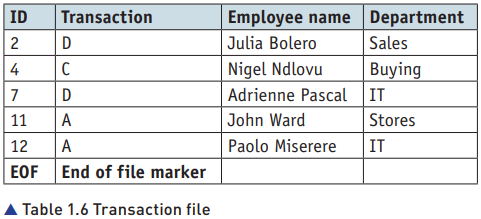

- The steps to update the master file using a transaction file are:
Read the first record from the transaction file and the old master file.
Compare the IDs from both files.
If IDs do not match, write the old master file record to the new master file.
If IDs match, perform the transaction:
    D (Delete): Do not write the old master file record to the new master file.
    C (Change): Write the transaction file data to the new master file.
    A (Add): Add new records from the transaction file to the new master file after processing all records from the old master file.
Repeat the process until the end of the old master file.
Write remaining records from the transaction file to the new master file.- or, algorithmically speaking,
1 First record in the transaction file is read
2 First record in the old master file is read
3 REPEAT
    4 IDs are compared
    5 IF IDs do not match, old master file record is written to new master file
        6 IF IDs match transaction is carried out
        7 IF transaction is D, old master file record is not written to new master file
        8 IF transaction is C, data in transaction file is written to new master file
    9 IF IDs match, next record from transaction file is read
    10 Next record from master file is read
11 UNTIL end of old master file
12 Data in transaction file record is written to new master file
13 Any remaining records of the transaction file are written to the master file -
Algorithm for Updating a Master File
Read the first record from the transaction file.
Read the first record from the old master file.
Repeat the following steps until the end of the old master file:
    Compare IDs from the transaction and master files.
    If IDs do not match, write the old master file record to the new master file.
    If IDs match:
        If the transaction is 'D' (Delete), do not write the record.
        If the transaction is 'C' (Change), write the transaction data to the new master file.
        Read the next record from the transaction file.
    Read the next record from the master file.
Write the current transaction file record to the new master file.
Write any remaining records from the transaction file to the new master file. -
steps:
- Compare records from both files sequentially.
- Process deletions, changes, and additions as described.
- Create a new master file reflecting all updates.
-
example scenerios:
- a new worker starts with the company: their record needs to be added
- a worker moves to different department: their record must be amended or changed
- a worker leaves the company: their record needs to be removed or deleted
Use of batch processing in payroll
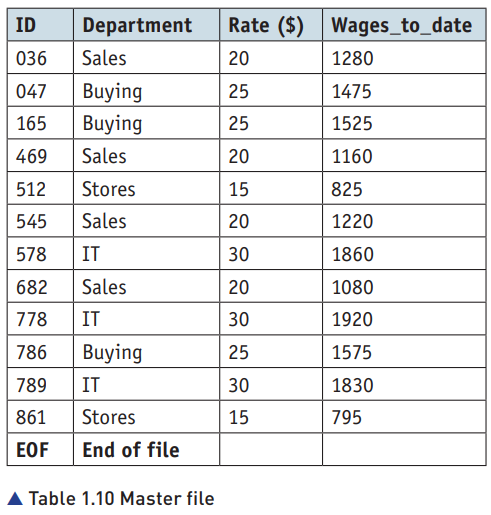
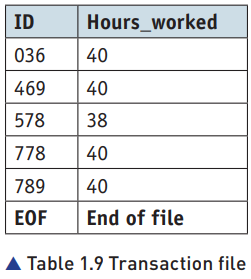
- assume the transaction file is already sorted and validated
- system goes through each transaction file and record
- from the matching master file record
- calculated the employee's wages for the week
- add the wages to be paid
- algorithm:
First record in the transaction file is read
First record in the old master file is read
REPEAT
    IDs are compared
    IF IDs do not match, old master file record is written to new master file
    IF IDs match transaction/calculation is carried out
        Computer calculates the pay, Rate (from master file) multiplied by hours worked (from transaction file)
        Wages _ to _ date is updated and record is written to new master file
    IF IDs match, next record from transaction file is read
    Next record from master file is read
11 UNTIL end of transaction file
12 Remaining records of the master file are written to
the new master file - or in other words:
Read the first record from the transaction file.
Read the first record from the old master file.
    Repeat:
    Compare the IDs from the transaction and master files.
    If IDs do not match, write the old master file record to the new master file.
    If IDs match:
        Calculate the weekly pay:
            Weekly Pay = Rate × Hours Worked
        Update Wages_to_date:
            Wages_to_date = Wages_to_date + Weekly Pay
        Write the updated record to the new master file.
    Read the next record from the transaction file.
    Read the next record from the master file.
Until the end of the transaction file.
Write any remaining records from the old master file to the new master file.
Batch processing with customer orders
- Order Collection: Customer orders are added to a transaction file throughout the day
- End-of-Day Processing: The transaction file is processed with the master file at the end of the day.
- Stock Check and Updates
- In Stock: If items are in stock, they are added to a picking list for the warehouse staff to prepare for shipment.
- Out of Stock: If items are not in stock, they are ordered from suppliers.
- Warehouse Operations: Warehouse staff package the ordered goods for shipment.
- Delivery Allocation: Packaged goods are assigned to delivery vehicles.
- Invoice Generation: Invoices are created and sent to customers.
- algorithm:
First record in the transaction file is read
First record in the old master file is read
REPEAT
    Cust _ nos are compared
    IF Cust _ nos do not match, old master file record is written to new master file
    IF Cust _ nos match transaction/calculation is carried out
        Computer calculates New _ orders minus Payment _ made and subtracts from Balance
        Balance is updated and record is written to new master file
    IF Cust _ nos match, next record from transaction file is read
    Next record from master file is read
UNTIL end of transaction file
Remaining records of the master file are written to the new master file - in other words:
Read Records: Read the first record from both the transaction and master files.
Comparison: Compare customer numbers (Cust_nos) in both files.
    No Match: Write the master file record to the new master file.
    Match: Calculate the new balance.
Balance Update:
    Calculation: Subtract payments made from new orders and update the balance.
    Update: Write the updated record to the new master file.
Next Records: Read the next records from both files and repeat the process until the end of the transaction file.
Finalize: Write any remaining records from the master file to the new master file.