2. Hardware and Software
(Incomplete)
Mainframe computers and super computers
Mainframe Computers
- used by large organizations for bulk data processing
- applications:
- censuses,
- statistics,
- transaction processing
- Larger and more powerful than personal computers, laptops, or tablets.
- Cost at least $75,000 in 2020.
- Originated with large CPUs housed in steel cabinets ("main frame" or "big iron").
- Evolved significantly despite the rise of PCs.
- Notable feature: Reliability, Availability, and Serviceability (RAS).
- Modern PCs have multi-core CPUs for parallel processing.
- Mainframes have hundreds of processor cores for multitasking and multi-user operations.
- Size has decreased from room-sized to large cupboard-sized.
- Resistant to viruses and Trojan horses.
- Used mainly in commercial organizations, less known to the general public.
- example:
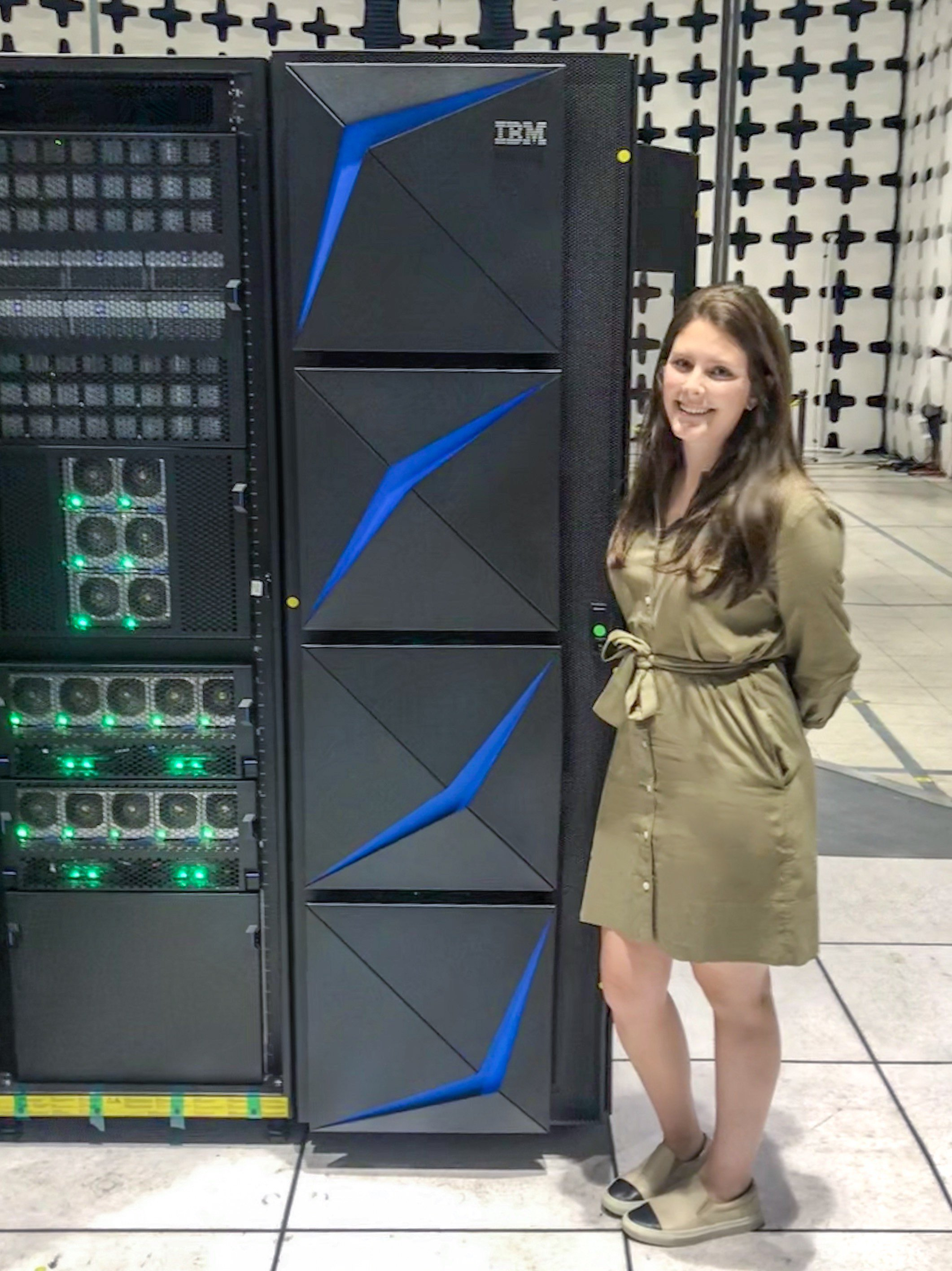
- most advanced mainframe so far is: IBM z15 (the capinet itself is taller than the average person)
- has 190 cores
Characteristics
- Longevity
- Great longevity, can run continuously for long periods.
- Used by governments, banks, and telecom companies.
- Expensive to shut down and dispose of hardware securely.
- COBOL language still in use, but fewer professionals trained in it.
- Threats: Lack of skilled professionals, rise of Cloud computing.
- Solution: Combine mainframes with Cloud computing.
- Efficiency and dependability maintain popularity.
- RAS (Reliability, Availability, Serviceability)
- Reliability: Processors self-check for errors and recover without impact.
- Availability: High availability with long MTBF (Mean time between failures) and quick recovery from failures.
- Serviceability: Can identify failure causes and replace components with minimal impact (with least/no downtime).
- Security
- High level of data security, crucial for handling large volumes of personal data.
- Security features:
- Multi-factor authentication,
- levels of access,
- data encryption,
- secure operating systems,
- continual monitoring
- Performance Metrics
- Speed measured in MIPS (Millions of Instructions Per Second).
- Benchmark tests used to compare performance.
- Cost often linked to MIPS.
- Volume of Input, Output, and Throughput
- Specialized hardware for input/output operations.
- Handles very large data volumes (terabytes).
- High throughput with billions of transactions per day.
- Fault Tolerance
- Can continue operating despite component failures.
- Hardware and software redundancy ensures minimal disruption.
- Operating System
- Can run multiple OS simultaneously (z/OS, z/VM®, Linux®).
- Efficient parallel processing with task division among processor cores.
- Type of Processor
- Hundreds of processor cores.
- Term 'CPU complexes' is used to describe multiple processors by some manufacturers.
- Heat Maintenance
- Historically used liquid cooling, now a mix of air and water cooling.
- More powerful systems require effective heat management.
Uses
- Banking Sector
- Process billions of transactions daily.
- Handle large volumes of data for batch processing (e.g., overnight bank statements, backups).
- Census Data Processing
- Manage enormous data from population surveys.
- Historically used since the 1950s (e.g., UNIVAC 1).
- Some countries still rely on mainframes despite advances in PC processing power.
- Industry Statistics
- Process data on businesses, employees, and wages.
- Help companies understand market trends and competitors.
- Consumer Statistics
- Analyze demand for products, household incomes, and employment status.
- Assist in pricing, marketing, and understanding market saturation.
- Transaction Processing
- Execute multiple operations to complete single transactions (e.g., bank transfers).
- Ensure error-free operations, maintaining data integrity.
- Designed for continuous availability and fault tolerance.
Advantages
- High Reliability
- Rarely experience system downtime.
- Can handle hardware and software upgrades without shutting down.
- Performance
- Continuously improving in speed and power.
- Outperform PCs, laptops, and other devices.
- Data Handling
- Capable of storing and processing vast amounts of data.
- Can run different operating systems and handle data in various formats.
- Security
- Equipped with strong encryption systems and complex authorization procedures
Diadvantages
- Cost
- Very expensive to purchase.
- High costs for personnel required to run and maintain them.
- Physical Space
- Require large rooms for housing.
- Advanced cooling systems needed, increasing installation and running costs.
- Cloud Migration
- Many organizations are moving to Cloud-based services to avoid buying their own systems.
- Mainframe software is more expensive compared to Cloud services.
Super Computers
- More powerful than mainframes.
- Can have over 100,000 processing cores.
- Capable of massive parallel processing.
- Example: Summit supercomputer at Oak Ridge National Laboratory (2018).
- Summit's performance: Can perform tasks in 1 second that would take the world population 305 days.
- Size: Fills a room the size of two tennis courts.
- example:
- Cray XC40 supercomputer
- 172 000 processor cores.
- Several countries have one of these for weather forecasting, scientific research, computational modelling
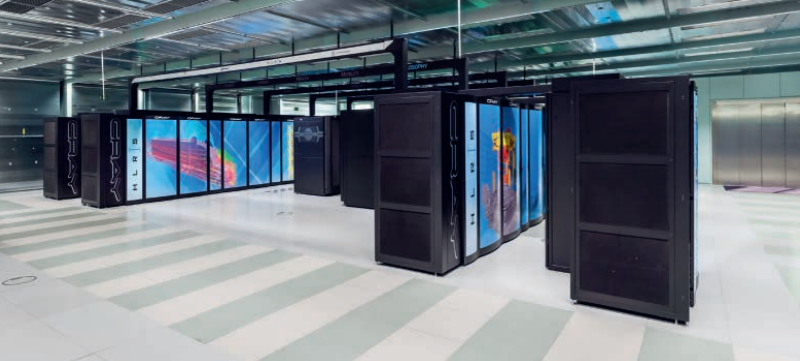
- Cray XC40 supercomputer
Characteristics
- Longevity
- Short lifespan of about five years.
- Constantly replaced by faster models in research institutions and meteorology.
- RAS (Reliability, Availability, Serviceability)
- Not typically associated with supercomputers.
- Security
- High level of security, often with end-to-end encryption.
- Used for sensitive data storage like DNA profiles.
- Performance Metrics
- Speed measured in FLOPS (Floating Point Operations Per Second).
- Speeds now measured in petaflops (PFLOPS), with future targets of exaflops (EFLOPS).
- Volume of Input, Output, and Throughput
- Designed for maximum processing power and speed.
- Throughput is a characteristic of mainframes, not supercomputers.
- Fault Tolerance
- High likelihood of component failures due to the large number of processors.
- Similar fault tolerance approaches as mainframes but more prone to interruptions.
- Operating System
- Typically runs one OS, usually Linux.
- Uses massively parallel processing with many processor cores, each with its own OS.
- Type of Processor
- Hundreds of thousands of processor cores.
- Uses multiple GPUs (Graphics Processing Units).
- Heat Maintenance
- Significant overheating issues due to high power consumption.
- Requires direct liquid cooling to manage heat.
Uses
- National Defense and Data Encryption
- Design nuclear weapons.
- Encrypt sensitive data.
- Scientific Research and Quantum Mechanics
- Perform calculations for atomic and subatomic particle behavior.
- Example: Juqueen and Juwels supercomputers in Germany.
- Weather Forecasting
- Process data from weather stations, satellites, etc.
- Create models to predict future weather patterns.
- Example: UK Meteorological Office uses Cray XC40 supercomputers.
- Climate Research
- Analyze long-term environmental data.
- Predict climate change impacts.
- Use models like the Community Earth System Model (CESM).
- Drug Research
- Develop new medications by comparing new compounds with past research.
- Monitor ingredient interactions and predict drug efficacy and side effects.
- Genetic Analysis
- Identify genes linked to diseases.
- Reduce research time from months to minutes.
Advantages
- Processing Speed
- The fastest data processing computers available
- Massively Parallel Processing
- Utilizes massively parallel processing, making them more powerful than mainframes and PCs.
Diadvantages
- Cost
- Extremely expensive to buy and install (e.g., Summit supercomputer costs $200 million).
- Operating Systems
- Typically have one operating system, unlike mainframes which can support multiple.
- Fault Tolerance
- Less fault-tolerant than mainframes.
- More downtime compared to mainframes, though less than other systems.
Comparison
Advantages vs Disadvantages of Mainframe Computers and Supercomputers
| Category | Advantages | Disadvantages |
|---|---|---|
| Mainframe Computers |
|
|
| Supercomputers |
|
|
Mainframe Computers vs. Supercomputers
| Aspect | Mainframe Computers | Supercomputers |
|---|---|---|
| Primary Use | Transaction processing, batch processing, large-scale data handling | Scientific research, simulations, complex calculations |
| Speed | High speed, optimized for throughput | Extreme speed, optimized for parallel processing |
| Cost | Expensive to purchase and maintain | Extremely expensive to purchase and install |
| Reliability | Very high reliability, minimal downtime | Reliable, but less fault-tolerant than mainframes |
| Security | Strong security features, complex encryption | High security, but focused more on processing power than encryption |
| Operating Systems | Supports multiple operating systems | Usually runs on a single operating system |
| Usage Examples |
|
|
System Software
- refers to programs that control a computer's hardware and application software.
Compilers
- Translate high-level programming languages into machine code (binary form) that the processor can execute.
- Process:
- Translate source code (high-level language) into object code (machine code)
- Often requires multiple passes through the program for error checking and resolving references.
- Produces a list of error messages after translation.
- Output:
- Compiled programs are executable files
- that run directly without needing the compiler present
- (will sometimes need a runtime environment with all the DLLs (Dynamic Link Libraries) to link to)
- Languages:
- Early examples include FORTRAN, COBOL, and LISP;
- modern examples are C++, C#, Visual Basic, Pascal.
Interpreters
- Translate and execute high-level language programs one statement at a time.
- Process:
- Converts source code into an intermediate form and executes it immediately.
- Stops translation at the first error encountered,
- allowing for immediate debugging.
- Each statement is translated every time it is executed,
- requiring the interpreter to be in memory during execution.
- Advantages:
- Portable between different operating systems.
- Useful for program development with immediate execution and error feedback.
- Saves memory as only a few lines need to be in memory at a time.
- Examples:
- Python often uses a combination of compilation (to bytecode) and interpretation (via a virtual machine).
- Same story with Java, compiled to Java Bytecode and intepreted in Java Virtual Machine (JVM).
Compilers vs Intepreters
| Compilers | Interpreters | |
|---|---|---|
| Advantages |
|
|
| Disadvantages |
|
|
Linkers
- Linker is short for 'link editor'
- Combine object files or modules created by a compiler into a single executable file.
- Process:
- Modules are written separately and then linked together.
- Allows large programs to be compiled in smaller parts, conserving RAM.
- Object code from different modules is saved on storage and combined later.
- Advantages:
- Facilitates modular programming, reducing memory requirements.
- Simplifies error correction as only the faulty module needs fixing.
- Challenges:
- Variable name conflicts.
- Requires detailed documentation for module integration.
Device Drivers
- Enable the OS and application software to communicate with hardware devices.
- Role:
- Acts as an interface between software and hardware.
- Translates software commands into hardware-specific instructions.
- Importance:
- Essential for the operation of hardware devices.
- Many drivers are included with the OS for basic functionality.
- Specialized features of hardware require specific drivers.
- Drivers are OS-specific; a driver for one OS may not work on another.
- Examples:
- Printer drivers,
- sound cards,
- monitors,
- mice,
- SSDs,
- network cards,
- keyboards,
- disk drives.
Operating Systems (OS)
- Manage computer hardware and software resources, acting as an interface between the user and the computer.
Features
- Memory Management:
- Allocates RAM for each program and ensures data integrity.
- Prevents data corruption by managing program memory allocation.
- Input/Output Management:
- Handles data input and output via device drivers.
- Communicates with input devices and sends data to output devices like printers.
- File Management:
- Manages file storage and retrieval.
- Keeps track of file locations and available storage space.
- Multitasking:
- Allocates CPU time to multiple tasks/programs.
- Manages task execution to ensure fair resource distribution.
- Error Handling:
- Displays error messages and requires user intervention for resolution.
- Security:
- Manages user login and password encryption.
- Controls file permissions and access rights.
- System Shutdown:
- Closes running software safely.
- Gradually shuts down the OS and signals the hardware to power off.
Boot Process
- BIOS: Basic Input/Output System stored in ROM, executes during boot-up.
- OS Loading: Instructions for loading the OS are in ROM; the main OS is loaded from the hard disk.
-
Sequence of steps that a computer system goes through when it is powered on or restarted
-
Involves several stages, including hardware checks, loading the BIOS, initializing hardware components, and finally loading the operating system
-
Steps:
- Power On
- The power supply sends a signal to the motherboard and the processor
- POST (Power On Self Test)
- The BIOS (Basic Input/Output System) or UEFI (Unified Extensible Firmware Interface) firmware is activated.
- The BIOS performs a POST to check if the essential hardware components (memory, keyboard, storage devices, etc.) are functioning correctly.
- If the POST is successful, the BIOS continues the boot process. If not, it generates error messages or beep codes.
- Load BIOS/UEFI Settings
- The BIOS/UEFI initializes and configures the hardware components.
- The BIOS/UEFI settings can be configured by the user to manage hardware configurations and boot priorities.
- Locate and Load Boot Loader
- The BIOS/UEFI looks for a boot loader in the bootable device (usually specified in the BIOS settings).
- The boot loader is a small program that loads the operating system. Common boot loaders include GRUB (for Linux) and Windows Boot Manager.
- Load Operating System
- The boot loader loads the kernel of the operating system into memory.
- The operating system initializes its components, drivers, and services.
- Initialize User Interface
- Once the OS is fully loaded, it initializes the user interface, allowing the user to interact with the system.
- This includes loading the login screen or directly presenting the desktop environment.
- Power On
1. Power On
↓
2. Power-On Self-Test (POST)
↓
3. Load BIOS/UEFI Settings
↓
4. Locate and Load Boot Loader
↓
5. Load Operating System
↓
6. Initialize User Interface
Utility Software
- I probably wont complete this.